Run case-based classes on the BossCE AI Academy: your own topics and marking scheme, live sessions on the projector, and completion certificates with your institution's name.
Classes and join codesYour marking schemeLive Class modeCertificates of CompletionResults without the paperwork
For lecturers, clinical tutors and supervisors in medicine and dentistry
Edition: November 2026 bossce.com/teach
Lecturer Guide
Overview
How It Works
Students practise clinical reasoning on realistic cases and are marked against your learning objectives and current guidance. You see where the class is getting it wrong, and teach to that.
1. Create a class
One code and one link for the whole cohort. Students join from the Academy in seconds.
2. Set topics and marking
Pick BossCE topics or write your own. Your learning objectives are the marking scheme.
3. Practise or go live
Homework with due dates, or a Live Class on the projector with results as answers arrive.
4. Results and certificates
See each objective's % met, download a report, and award verifiable certificates.
Undergraduates
Reasoning before the patient
Practise history, diagnosis and management on cases matched to their year
Rehearse OSCE and viva answers, with two viva questions after every case
Learn to check sources: every answer cites guidelines and papers
Weekly Challenge and opt-in leaderboards keep practice steady
Postgraduates
Specialty-level judgement
Complex cases with comorbidities and complications, marked to trainee standard
Supervisor-written topics and case banks for small cohorts
Sourced answers for seminars, case presentations and literature grounding
Exam Prep Tracks for MFDS Part 1, MRCS Part A and MRCP Part 1, with readiness by syllabus area
Certificates and a CPD log as evidence of structured learning
What a student gets after each case: what they got right, what they missed, a model answer, a score out of 5, two viva questions and the sources used. What you get: attempts, average scores and the percentage of the class meeting each objective, live.
BossCE AI Lecturer Guide · November 20262
Lecturer Guide
Setting up
Your Class, Your Marking Scheme
1
Get lecturer access
Sign in at bossce.com, open My Account → Lecturer and request access with your institution and position.
2
Create a class
Name it (for example "Oral Surgery, Year 4") and choose the level. You get a class code, a join link and a WhatsApp invite. Make a new code at any time if it leaks.
3
Add topics
Add any of the BossCE AI Academy topics, or write your own. Draft with BossCE AI suggests the objectives, level, specialty and references from a title and a short note; you edit before saving.
The marking scheme is your learning objectives. One per line, each a point a good answer must cover. Every answer is scored out of 5 against them, and each objective is recorded as met or missed.
Title
Management of Dry Socket
Note for Draft with BossCE AI (optional)
Year 4; focus on chairside diagnosis and follow-up
Learning objectives: the marking scheme
1. Recognise alveolar osteitis from history and examination
2. Exclude retained root, fracture or infection
3. Irrigate and place a suitable dressing; give analgesia advice
4. Explain that antibiotics are not routinely needed
5. Arrange review and say when to return
Level and specialty
Undergraduate · Oral & Maxillofacial Surgery
Save topicDraft with BossCE AI
4. Choose how students get their case
Self-study
BossCE AI writes a new case each time
A fresh, realistic case from your objectives for every attempt.
Live classes
Everyone gets the same case
Write or paste one case (or let BossCE AI draft it). The whole class answers it, so you can project it.
Variety
A random case from my case bank
Up to 10 of your own cases, for example from your clinics, shown at random.
Remove patient names and identifiers from your own cases. Set a due date per topic: students see it in their class tab, and your class page shows how many finished on time.
BossCE AI Lecturer Guide · November 20263
Lecturer Guide
In the lecture room
Live Class Mode
Project one screen. Students answer on their own phones or laptops. The room sees the class's results as answers come in, with no names on screen.
Oral Surgery, Year 4
Join the class
BCE-7KQ2M
1. Sign in at bossce.com 2. Open the Academy and enter the code 3. Tap Join the Live Class 32 students in this class
1 Join2 Case3 Results4 Discussion
1. Join. Large code and QR. Students tap Join the Live Class and see a waiting screen.
Oral Surgery, Year 4
Case · Extraction in a patient taking warfarin
A 68-year-old man attends for extraction of a lower right first molar. He has atrial fibrillation and takes warfarin; INR yesterday 2.8. He asks whether he should stop warfarin first. What would you do, and why?
08:42
18 of 32 submitted
1 Join2 Case3 Results4 Discussion
2. Case. Students' screens open the case automatically. Timer and submissions on screen.
Oral Surgery, Year 4
Class results · anonymous
Class average 3.2/5
1 Join2 Case3 Results4 Discussion
3. Results. Score spread, class average and each objective's % covered. Most-missed in orange.
Oral Surgery, Year 4
Discussion · what a strong answer covers
Check the INR and when it was measured Covered by 25% of the class
Do not stop warfarin routinely Covered by 69% of the class
Plan local haemostatic measures Covered by 50% of the class
1 Join2 Case3 Results4 Discussion
4. Discussion. Reveal your objectives one at a time, each with how much of the class covered it.
Start a session
Class page → blue Live Class bar → choose the topic → Start Live Session. Press F for full screen; move with → and ←. Closing the tab ends the session.
Rehearse first
Tick Demo mode to run the whole flow with 32 simulated students. Nothing is saved. Only answers given after stage 2 opens count in the live results.
BossCE AI Lecturer Guide · November 20264
Lecturer Guide
Lesson plan
A One-Hour Live Class
For 20 to 200 students with phones or laptops. Set the topic to Everyone gets the same case the day before, and ask students to register before they come.
0:00
Join. Project the code and QR; students tap Join the Live Class.
0:05
Case. Start the 10-minute timer. Walk around; no hints.
0:20
Results. Let the answers settle; students read their feedback.
0:25
Teach the gap. Start with the orange objective, then the next lowest.
0:45
Discussion. Reveal the objectives one by one; pairs answer a viva question.
0:55
Next. Run a second round on another topic, or set the next due date.
What makes it work
Keep objectives specific: "check INR within 72 hours", not "know anticoagulants"
Use one fixed case, so the projected case is the one they answer
Teach to the data: the most-missed objective is the lesson
A second round on a related topic shows the class what it learned
Students who join late or have no device
Late arrivals open the topic from their Class tab; their answer still counts
Pairs can share one phone: the answer is marked for the account that submits it
Weak Wi-Fi: answers are short text, so mobile data is enough
After class: every answer is saved to your class results, so the live session also counts as an attempt for due dates, the PDF report and Certificates of Completion.
BossCE AI Lecturer Guide · November 20265
Lecturer Guide
Recognition
Certificates of Completion
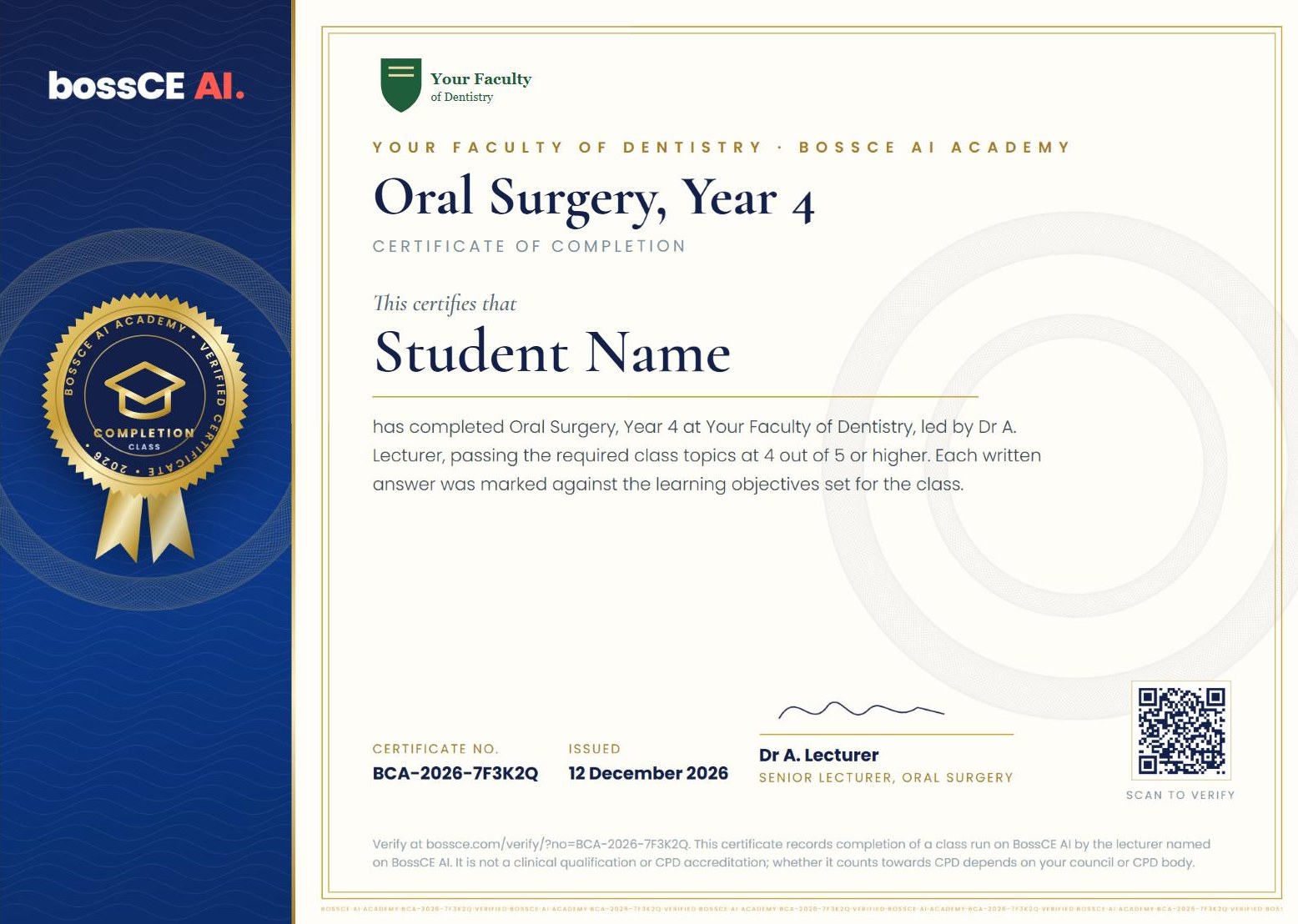
Your class can award its own certificate, with your institution's logo beside the BossCE AI logo, your name, title and signature. Each one is numbered and checkable by anyone at bossce.com/verify.
Illustration. Your logo appears only after you confirm you have the institution's permission to use it.
1
Set the rule
Pass mark per topic (3, 4 or 5 out of 5) and how many topics to pass: all, or at least a number you choose.
2
Add your details
Institution or department, lecturer name and title, logo (PNG, JPG or WebP, up to 2 MB) and an optional signature.
3
Preview and save
Preview Certificate shows exactly what students receive.
4
Students receive it
Issued automatically when a student meets the rule, or by you with Issue next to their name. It appears in their certificates and CPD log, ready as a PDF or for LinkedIn.
A Certificate of Completion records completion of a class run on BossCE AI by the lecturer named. It is not a clinical qualification or CPD accreditation. Certificates already issued keep the details they were issued with.
BossCE AI Lecturer Guide · November 20266
Lecturer Guide
Results and privacy
See Patterns, Not Paperwork
Your class page, per topic
Attempts, average score, on-time completion, and the % of the class meeting each objective. Tick Live to refresh as answers arrive; download a branded PDF report for your records.
Recognise alveolar osteitis86%
Exclude retained root or fracture61%
Antibiotics not routinely needed28%
Irrigation, dressing and analgesia74%
Review and when to return52%
Illustration of a topic's objectives.
Stored
Never stored
Student name, topic, score out of 5, which objectives were met, date and time
The case text a student saw
Your topics, objectives and class cases (you wrote them)
What the student wrote
Limits to know
Each marking uses one of the student's daily questions (10 a day on a free account). Partner universities can have a class allowance switched on, so class answers do not use students' own questions
Draft with BossCE AI has a fair daily limit per lecturer
Text with IC/NRIC or passport numbers, phone numbers or emails is refused
BossCE AI names its sources but can be wrong: review your objectives and teach students to check
Weekly Challenge and leaderboards
Every Monday the Academy sets one dental and one medical topic for everyone. Class and national boards show names only for students who opt in.
BossCE AI Lecturer Guide · November 20267
Lecturer Guide
Quick reference
Questions Lecturers Ask
Do students pay?
No. Student accounts are free, with 10 questions a day. No registration number is needed.
Can I use my own syllabus?
Yes. Write topics with your objectives, or use a BossCE topic and add your own case.
Can two lecturers run one class?
Yes. Add co-lecturers on the class page; they see results and can run live sessions.
What if a student did the topic before class?
Live results count only answers given after you open stage 2, so earlier attempts do not mix in.
Will students see each other's scores?
Not on the projector. Class leaderboards are optional, and names appear only for students who opt in.
Can I change a certificate after issuing?
New settings apply to certificates issued from then on. Issued ones keep their original details.
The code was shared outside the class.
Press Make a new code. The old code stops working; students already in the class stay.
How do I report a marking error?
Email hi@bossce.com with the topic name. Never include patient details.
Can I train other lecturers?
Yes. Become a Certified BossCE AI Trainer: free and fully online, including a module on running Live Classes. Apply at bossce.com/trainer.
Start your first class
Scan to open the Lecturer Dashboard, or go to bossce.com/teach. For a faculty pilot, partnership or an online session for your lecturers, write to hi@bossce.com.
Free for students · Academic Partners listed at no fee